What Are Webhooks? A Comprehensive Go Tutorial
Hi, I'm Uttkarsh , a tech enthusiast with a knack for building cool stuff. I enjoy translating ideas into code, whether it's crafting user interfaces or tackling new challenges. There's a certain satisfaction in creating things. I'm here to keep learning, coding, and having fun along the way. When not coding, you'll find me exploring different interests and trying to make the most out of every moment. Open to collaborations and always up for a tech chat. Feel free to connect!
Introduction
In modern system architecture, building efficient communication channels between microservices is crucial. Traditionally, if your application needed to know when a payment cleared, a build finished, or a shipment went out, it had to continuously poll an external API. This constant asking "Is it ready yet?", "How about now?" wastes massive amounts of server resources and bandwidth.
Enter webhooks.
A webhook serves as an automated, event-driven traffic manager that flips the traditional API model on its head. Instead of your app pulling data, the source system proactively pushes data to you the exact moment an event occurs. By intelligently routing data only when needed, webhooks drastically reduce network latency, prevent server overload, and enhance the overall availability of distributed applications. Whether you're handling financial transactions with Stripe, managing code triggers via GitHub, or syncing data to your CRM, webhooks ensure your infrastructure remains responsive, scalable, and highly reliable.
How does it work?
In a standard API setup, your client machine initiates an HTTP request to a target server, waits for processing, and receives a direct response. In a webhook-enabled setup, the process introduces a detached, event-driven lifecycle:
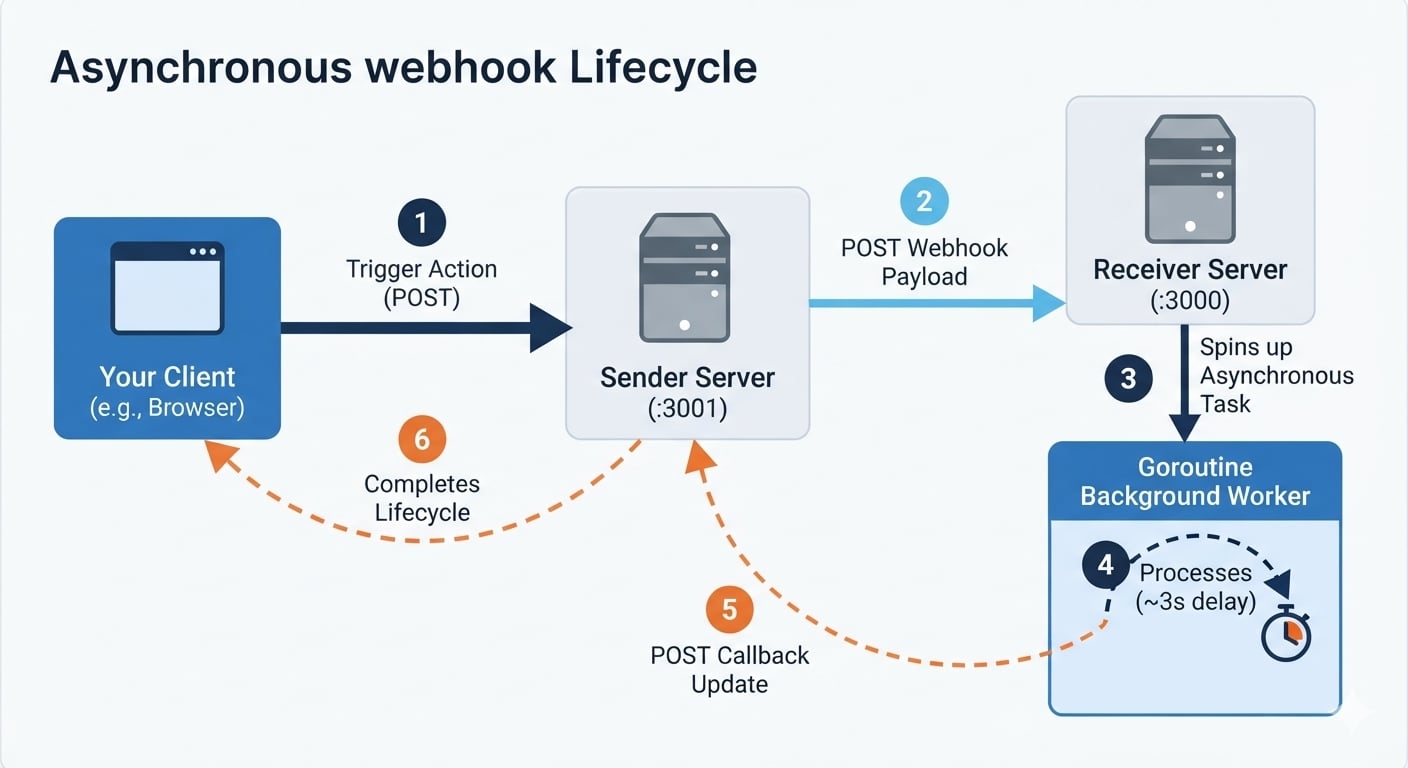
The Event Trigger: An action occurs on a system, for instance, a user pushes code or submits a form.
Immediate Data Payload Dispatch: The source system (Sender) constructs an HTTP POST request containing a JSON payload and immediately dispatches it to a pre-registered endpoint URL hosted on your application (Receiver).
The Immediate Acknowledgment: Instead of keeping the connection open while doing heavy processing, the Receiver evaluates the data shape, drops it into a background process, and immediately replies to the Sender with an HTTP 202 Accepted status code.
Connection Termination: The original HTTP connection between the Sender and the Receiver is completely severed. The Sender is freed up instantly.
The Asynchronous Callback: Seconds or minutes later, once the Receiver's background process successfully completes the long-running task, it opens a brand-new network connection back to the Sender's status endpoint to confirm final execution.
By strategically separating the initial ingestion from the actual background execution, webhooks optimize network resources, eliminate hanging client connections, and drastically improve application performance.
Understanding Webhooks: A Restaurant Delivery Analogy
To grasp why asynchronous design is so powerful, let's look at how modern web systems handle tasks by comparing them to a restaurant order experience. In this scenario:
The User is the hungry customer,
The Sender Server is the local restaurant,
The Receiver Server is the external delivery fulfillment center,
The Delivery Agent is the asynchronous callback response.
The Synchronous Polling Dilemma (Staring Out the Window)
Imagine you order food directly from the restaurant. The restaurant accepts your request, but because your food takes 45 minutes to cook and pack, you decide to stand by your front window. Every 30 seconds, you open the window and shout out to the street: "Is my food here yet? How about now?" You waste energy, block your window, and accomplish nothing until the food arrives. This is traditional API Polling.
The Asynchronous Webhook Workflow (The Smart Delivery)
Now consider an event-driven setup. You place your order with the restaurant (The Sender). Instead of making you wait on the line, the restaurant passes your order information to a fulfillment center (The Receiver).
The fulfillment center immediately texts you an order confirmation: "Order accepted, we are cooking it now!" (HTTP 202 Accepted) and closes the connection. You hang up and comfortably go watch a movie.
Meanwhile, out of sight, the kitchen cooks the food. Once it's fully prepared, they hand it over to a Delivery Agent. The agent drives out to your house and knocks on your door with the hot meal. This knock on the door is the Asynchronous Callback. The initial connection was split, nobody stood around wasting time, and the entire system functioned with peak efficiency.
Let’s stop staring at the window and cook up some code! 🍔
Guide to Cooking an Event-Driven Webhook in Go
We will leverage Go’s highly optimized native standard library to develop a completely self-contained local webhook loop. To simulate the entire event lifecycle on your own machine without relying on external providers, we will build two distinct servers running on different network ports:
The Receiver Server (:3000): Listens for incoming payment webhooks, offloads tasks to a background worker, and streams status updates back.
The Sender Server (:3001): Triggers the initial transaction simulation and runs a callback route to listen for final execution proofs. Through this tutorial, we will not just look at the final scripts, we will dissect the architectural design choices, avoid subtle performance traps, and look at vital notes.
The Receiver Server (:3000)
To understand the engineering behind webhooks, we are going to build the system incrementally. We will focus entirely on the receiver server first this is the system that listens for event notifications.
Start by creating a directory named receiver in your project folder, navigate into it, and create a main.go file.
mkdir receiver
cd receiver
touch main.go
Version 1.0: Ingesting Data Synchronously (The Foundation)
First, we need to create our basic server foundation. We define our data payloads (Payment and PaymentStatus) and write an HTTP handler that validates the request method, decodes the incoming JSON data, and responds back to the sender.
Open receiver/main.go and add the following initial code:
package main

import (
	"encoding/json"
	"fmt"
	"net/http"
	"os"
	"time"
)

type Payment struct {
	ID     string `json:"id"`
	AMOUNT int    `json:"amount"`
	USER   string `json:"user"`
}

type PaymentStatus struct {
	ID     string    `json:"id"`
	STATUS string    `json:"status"`
	AMOUNT int       `json:"amount"`
	USER   string    `json:"user"`
	TIME   time.Time `json:"time"`
}

func handlePaymentReceived(w http.ResponseWriter, r *http.Request) {
	// 1. Restrict methods to POST only
	if r.Method != http.MethodPost {
		http.Error(w, "Method not allowed", http.StatusMethodNotAllowed)
		return
	}

	// 2. Decode the incoming payment JSON
	var payment Payment
	err := json.NewDecoder(r.Body).Decode(&payment)
	if err != nil {
		http.Error(w, "Unable to read request body.", http.StatusBadRequest)
		return
	}
	defer r.Body.Close() // Clean up request resources

	// 3. Construct a quick response
	response := map[string]string{
		"status":  "success",
		"message": "Received message from " + payment.USER,
		"body":    fmt.Sprintf("Amount being processed %d.", payment.AMOUNT),
	}

	w.Header().Set("Content-Type", "application/json")
	w.WriteHeader(http.StatusAccepted) // Return 202 Accepted
	json.NewEncoder(w).Encode(response)
}

func main() {
	mux := http.NewServeMux()
	mux.HandleFunc("/webhook/pay", handlePaymentReceived)

	fmt.Println("Receiver server starting on port :3000...")
	err := http.ListenAndServe(":3000", mux)
	if err != nil {
		fmt.Printf("error starting server: %s\n", err)
		os.Exit(1)
	}
}
Notice that we return an HTTP status code
202 Acceptedinstead of200 OK. In the webhook world,202means "I have received your payload, and it looks structurally sound*, so I am accepting responsibility for it."* However, in this baseline Version 1.0, we aren't executing any background operations yet. If we add a heavy database write or a 3-second bank processing lag directly into this handler, the sender's HTTP connection will hang. To unlock the true power of an event-driven system, we need to offload the work.
Version 1.1: Spinning Up the Background Worker & The Defer Trap
Now, we introduce the asynchronous magic using a Go goroutine. We will dispatch the heavy processing task (simulated with a 3-second sleep) into the background so the HTTP handler can instantly return its 202 Accepted response and terminate the connection.
However, this is where we encounter a massive performance hazard if we aren't careful. When you send an asynchronous callback over the network, it can fail due to internet blips or a restarting target server. To build a resilient receiver, we wrap our callback client inside a retry loop (e.g., for i := 0; i < 3; i++).
A common instinct in Go is to write
defer resp.Body.Close()anddefer cancel()inside that retry block. Do not do this! In Go,deferstatements evaluate when the surrounding function exits, not when a loop iteration ends. If your code retries 3 times, all 3 response bodies and context timeouts accumulate in your application's memory simultaneously. Under high traffic, this trap will rapidly leak network sockets, exhaust available file descriptors, and crash your server entirely.
To avoid this, we must explicitly manage resource closure manually inside our loop block.
Let's modify the handlePaymentReceived function inside receiver/main.go to add our retry-safe background worker:
func handlePaymentReceived(w http.ResponseWriter, r *http.Request) {
    // ... (Existing HTTP validation, JSON decoding, and response map generation) ...
	response := map[string]string{
		"status":  "success",
		"message": "Received message from " + payment.USER,
		"body":    fmt.Sprintf("Amount being processed %d.", payment.AMOUNT),
	}

	// NEW CHANGES: SPIN UP THE ASYNCHRONOUS RETRY LOGIC
	go func(p Payment) {
		time.Sleep(3 * time.Second) // Simulate intensive background processing
		var status PaymentStatus
		status.ID, status.AMOUNT, status.USER, status.STATUS, status.TIME = p.ID, p.AMOUNT, p.USER, "Success", time.Now()

		jsonData, err := json.Marshal(status)
		if err != nil {
			return
		}

		for i := 0; i < 3; i++ {
			ctx, cancel := context.WithTimeout(context.Background(), 3*time.Second)
			req, err := http.NewRequestWithContext(ctx, "POST", "http://localhost:3001/webhook/callback", bytes.NewBuffer(jsonData))
			if err != nil {
				cancel()
				return
			}

			client := &http.Client{}
			resp, err := client.Do(req)
			if err != nil {
				fmt.Printf("Network error on attempt %d: %v\n", i+1, err)
				cancel()
				time.Sleep(1 * time.Second)
				continue
			}

			fmt.Printf("Callback delivered successfully. Sender responded with status: %s\n", resp.Status)
			if resp.StatusCode == http.StatusAccepted || resp.StatusCode == http.StatusOK {
				resp.Body.Close() // Explicit manual cleanup inside loop
				cancel()
				break
			}
			resp.Body.Close() // Explicit manual cleanup inside loop
			cancel()
			time.Sleep(1 * time.Second)
		}
	}(payment)

	// ... (Existing response streaming code continues below) ...
	w.Header().Set("Content-Type", "application/json")
	w.WriteHeader(http.StatusAccepted)
	json.NewEncoder(w).Encode(response)
}
With our Receiver listening room warmed up and safely managing its background tasks, it’s time to head over to the other side of our delivery pipeline. To make this event lifecycle run end-to-end, we need an operational hub that can trigger our mock transaction data and stand by to catch our delivery updates. Let's step out of the kitchen and engineer The Sender Server (:3001).
The Sender Server (:3001)
To complete our event-driven system, we need a separate component that initiates the checkout simulation and registers a listener route to catch final status confirmations.
Start by going back to your main project folder, creating a separate directory named sender, and creating a new main.go file inside it.
cd ..
mkdir sender
cd sender
touch main.go
Version 1.0: Triggering the Payment Request (The Entry Point)
First, we establish our Sender foundation. We create a makePayment handler that functions as our webhook trigger. It reads a payment payload from the user, forwards it directly to our Receiver server on port :3000, and streams the immediate response back.
Open sender/main.go and add the following initial code:
package main

import (
	"bytes"
	"encoding/json"
	"fmt"
	"io"
	"net/http"
	"os"
)

type Payment struct {
	ID     string `json:"id"`
	AMOUNT int    `json:"amount"`
	USER   string `json:"user"`
}

func makePayment(w http.ResponseWriter, r *http.Request) {
	// 1. Restrict methods to POST only
	if r.Method != http.MethodPost {
		http.Error(w, "Method not allowed", http.StatusMethodNotAllowed)
		return
	}

	// 2. Decode user request body
	var payment Payment
	err := json.NewDecoder(r.Body).Decode(&payment)
	if err != nil {
		http.Error(w, "Unable to read request body.", http.StatusBadRequest)
		return
	}

	// 3. Serialize data to forward to the webhook receiver
	req, err := json.Marshal(payment)
	if err != nil {
		http.Error(w, "Unable to marshal request.", http.StatusInternalServerError)
		return
	}

	// 4. Fire the outbound POST request to port :3000
	resp, err := http.Post("http://localhost:3000/webhook/pay", "application/json", bytes.NewBuffer(req))
	if err != nil {
		http.Error(w, "Unable to process this request.", http.StatusInternalServerError)
		return
	}
	defer resp.Body.Close() // Safeguard network descriptors

	// 5. Read the fast 202 Accepted body returned by the receiver
	respBody, err := io.ReadAll(resp.Body)
	if err != nil {
		http.Error(w, "Unable to read receiver response.", http.StatusInternalServerError)
		return
	}

	// 6. Pipe the status and payload back to the terminal client
	w.Header().Set("Content-Type", "application/json")
	w.WriteHeader(resp.StatusCode)
	w.Write(respBody)
}

func main() {
	server := http.NewServeMux()
	server.HandleFunc("/pay", makePayment)

	fmt.Println("Sender server starting on port :3001...")
	err := http.ListenAndServe(":3001", server)
	if err != nil {
		fmt.Printf("error starting server: %s\n", err)
		os.Exit(1)
	}
}
At this point, the Sender can successfully pass data along to the Receiver, and our terminal client will instantly receive the 202 Accepted confirmation map. However, our transaction loop is currently a dead end. When the Receiver wakes up 3 seconds later to deliver the final processing update, it will hit a wall because our Sender doesn't have an open door to receive incoming webhook data. We need to implement a callback route.
Version 1.1: Registering the Callback Listener (Closing the Loop)
Now, we introduce the crucial asynchronous landing pad: ackCallback. This endpoint fulfills the core role of a webhook consumer. It stays open, decodes the independent transaction updates pushed by the Receiver's background worker, and streams back a clean 200 OK handshake acknowledgment to stop the retry loop.
Let's modify our main function and append the ackCallback handler inside sender/main.go:
func ackCallback(w http.ResponseWriter, r *http.Request) {
	if r.Method != http.MethodPost {
		http.Error(w, "Method not allowed", http.StatusMethodNotAllowed)
		return
	}

	// 1. Decode the independent status notification stream
	var statusData map[string]interface{}
	err := json.NewDecoder(r.Body).Decode(&statusData)
	if err != nil {
		http.Error(w, "Bad JSON", http.StatusBadRequest)
		return
	}
	defer r.Body.Close()

	w.Header().Set("Content-Type", "application/json")

	// 2. Validate background execution state and send back handshake
	if statusData["status"] == "Success" {
		w.WriteHeader(http.StatusOK) // 200 OK tells the receiver to stop retrying
		json.NewEncoder(w).Encode(map[string]string{"message": "Callback acknowledged successfully"})
	} else {
		w.WriteHeader(http.StatusInternalServerError)
	}
}

func main() {
	server := http.NewServeMux()
	server.HandleFunc("/pay", makePayment)

	// NEW CHANGES: REGISTER THE LANDING ROUTE PATH FOR PORT :3000 CALLBACKS
	server.HandleFunc("/webhook/callback", ackCallback)

	fmt.Println("Sender server starting on port :3001...")
	err := http.ListenAndServe(":3001", server)
	// ... (Existing server listen code continues below) ...
	if err != nil {
		fmt.Printf("error starting server: %s\n", err)
		os.Exit(1)
	}
}
With both the Receiver and Sender fully engineered, our code architecture is officially ready for deployment. The kitchen is fully staffed, the delivery hub is set up, and the callback loops are perfectly tuned. All that’s left is to light up the engines and watch the asynchronous communication dance in action. Let’s fire up our terminals and step through the process of running this entire event-driven system end-to-end.
Testing Your Webhook Engine: The E2E Verification
Now that both components of our event-driven system are fully cooked, it is time to spin them up simultaneously and watch the asynchronous magic play out in real time.
To run the program, open your terminal (or the integrated terminal in your IDE), ensure you are in your project root, and follow these steps to start the project.
Step 1: Fire Up the Receiver Server (:3000)
Open your first terminal window, navigate into your receiver directory, and execute the following command:
cd receiver
go run main.go
You will see the console log:
Receiver server starting on port :3000...
Step 2: Fire Up the Sender Server (:3001)
Open a second terminal window, navigate into your sender directory, and run the server:
cd sender
go run main.go
You will see the console log:
Sender server starting on port :3001...
Step 3: Triggering the Lifecycle via Windows PowerShell
With both servers running silently in the background, open a third terminal window. We will act as a client simulating a user check-out transaction.
If you are on Windows, using standard
curl.exewith inline JSON strings can be an absolute nightmare. PowerShell tends to strip double quotes out of your data payload before passing them along, causing your Go server to throw anUnable to read request bodyparsing error.To bypass this formatting head-scratcher entirely, always leverage PowerShell's native
Invoke-RestMethodcmdlet. It handles JSON serialization seamlessly.
Paste this single command into your third PowerShell window to trigger your new engine:
curl -X POST http://localhost:3001/pay \
  -H "Content-Type: application/json" \
  -d '{"id": "pay_txn_777", "amount": 1500, "user": "Charlie"}'
What to Watch For: Analyzing the Asynchronous Logs
The moment you hit enter on your trigger command, observe the immediate timeline of events split across your terminal screens:
Terminal 3 (Your Client Request):
Your client connection terminates instantly. It does not wait 3 seconds. It receives your custom JSON map right away: text body message status
body                         message                       status
----                         -------                       ------
Amount being processed 1500. Received message from Charlie success
Terminal 1 (Receiver Server Log):
The Receiver handles the request in milliseconds, delivers the 202 Accepted back to Terminal 3, and safely hands the data payload off to its background goroutine worker. The server stays responsive.
Terminal 2 (Sender Server Log):
Exactly 3 seconds later, the background goroutine wakes up from its simulated banking lag, serializes the updated payment status data, and hits the Sender's landing pad URL. Your Sender terminal instantly flashes:
Callback delivered successfully. Sender responded with status: 200 OK
The loop is closed. Your Sender verified the receipt, the Receiver's retry loop broke safely out of execution, and no server sockets were leaked or hung along the way.
Summary
In this blog, we’ve delved into the world of webhooks and learned how to build our own self-healing, event-driven engine using Go. We started by understanding the basics of asynchronous processing and how webhooks flip the traditional API model on its head by pushing data to your services the exact moment an event occurs. Using a restaurant delivery analogy, we made these concepts more relatable by comparing customers, restaurants, fulfillment centers, and delivery agents to clients, senders, receivers, and asynchronous callbacks.
We then moved on to a practical, step-by-step implementation, building out both a Receiver and a Sender server using nothing but Go's powerful standard library. Along the way, we explored the critical architectural decisions required to keep our infrastructure responsive, including offloading intensive tasks into background goroutines, implementing context-driven timeout constraints, and engineering a manual resource cleanup system to completely avoid the catastrophic defer loop trap.
Building an architecture like this entirely from scratch provides an invaluable foundation for understanding how production systems remain fast, scalable, and memory-optimized.
💬 Over to You !
If you made it this far, thank you for reading! I'd love to hear your thoughts, drop a comment below with your suggestions, or any bottlenecks you ran into while testing the loop.
If you found this guide helpful, please consider sharing or reposting it to help other developers!
For more hands-on backend deep-dives and system architecture projects, let's connect across the web:
Twitter/X: Uttkarsh
GitHub: https://github.com/Uttkarsh-raj
✍️ Hashnode: Follow my profile right here to never miss an upcoming architectural tutorial.
Until next time, keep cooking up clean code! 🚀